Neural Defend

Claims, refunds & account recovery NeuroDetect + NeuroVerify

The damage was never there. Neither was the customer.

Fraudsters now generate the evidence: a dent on a car taken from someone’s social feed, a crack on a parcel that arrived intact, a face or voice for an account that isn’t theirs. NeuroDetect examines submitted photos, videos and documents for edits and AI generation, and NeuroVerify checks the face or voice before a recovery goes through.

The problem, in numbers

Insurers, merchants and the FBI are describing the same shift.

  • £174m

    in fraudulent claims Allianz UK stopped in one year, across 34,200 cases. It reports fraudsters taking car photos posted online and using AI to create the damage.

    Allianz UK, 5 Jun 2026
  • 8 days

    of detention for a buyer who used AI to fake a video of dead crabs and claim a 195-yuan refund. The seller noticed the crabs’ sexes did not match between clips.

    China Daily, 12 Dec 2025
  • Cloned voice

    The FBI reports criminals getting into bank accounts with AI-generated audio of the account holder.

    FBI IC3, PSA I-120324, 3 Dec 2024
  • 7%

    of organisations say they are more than moderately prepared to detect AI-powered fraud. Deepfake social engineering and AI document forgery grew most.

    ACFE & SAS, 2026 benchmarking report

How each fraud gets done

Three workflows. Three different fakes.

Each one targets the moment a person decides on evidence they cannot inspect in person: a photo of damage, a photo of a parcel, a face or voice on a call.

Insurance claim

Damage photo + repair invoice
  1. Borrow a real photo

    A car someone posted online with the plate visible, a stranger’s kitchen, or a photo from an earlier claim.

  2. Add the damage

    Generative fill draws a cracked bumper or flood water. A cloning brush adds a dent. AI rewrites the numberplate to match the policy.

  3. Back it with paper

    A repair invoice for a believable sum. Allianz caught one for around £1,000 attached to an edited van photo.

  4. Upload through the app

    The file is recompressed on the way in. It reaches the adjuster as one more photo in the queue.

E-commerce refund

“Damaged on arrival” photo or video
  1. Buy the item

    A real order from a real account. Nothing about the purchase looks wrong.

  2. Generate the defect

    AI adds a crack to a shoe, mould to fruit or a snap to a phone case, or recolours the item. Researchers heard each example from Chinese merchants.

  3. Ask for a refund

    Where policy refunds without a return, the image is the only evidence. The item stays with the buyer.

  4. Repeat it

    A fake costs one prompt. Each merchant sees one plausible complaint, never the pattern.

Account recovery

Selfie, video call or voice
  1. Collect the person

    Name, birth date, address and security answers from breaches and social media. CISA notes these attacks are enriched by social-media data.

  2. Clone the face or voice

    Public video supplies both. The FBI describes AI audio of account holders and real-time AI video on calls.

  3. Call the help desk

    Claim a lost phone. Ask for a password reset or a new MFA device. CISA and the FBI describe Scattered Spider doing exactly this.

  4. Own the account

    The reset lands on the attacker’s device. Every login after it looks legitimate.

Why your checks pass it

Every check answers one question. None asks whether the evidence is real.

These controls work as designed. A generated dent is not a metadata problem, and a cloned voice knows the answers to your security questions.

CheckThe question it answersWhat gets through

Adjuster or agent review

Does this look like the damage described?

Generated damage built to look right. Small edits that keep the light and grain of the original photo.

Metadata / EXIF check

When, where and on what device was this taken?

Messaging apps and upload pipelines strip metadata from honest photos too, so its absence proves nothing. Fields can be rewritten in seconds.

Reverse image search

Has this photo appeared online before?

Anything not indexed or no longer near-identical: a cropped, flipped or newly damaged copy of a social-media photo, or a fully generated one.

Knowledge-based questions

Does the caller know the account’s details?

Answers that already sit in breached data and public profiles.

Liveness

Is a person in front of the camera?

Injected video and face swaps that blink on cue. Nothing at all on a voice-only call.

NeuroDetect

Was this file edited or generated?

Region-level findings on the photo, video, audio or document, with a heatmap and a forensic report for the claim file.

NeuroVerify

Is this face or voice real?

One risk score with six signals, including face manipulation and AI generative model analysis, before the reset is approved.

For the product rows, the last column is what the check adds.
One photo, three findings

A doctored photo should reach a person, not an auto-pay rule.

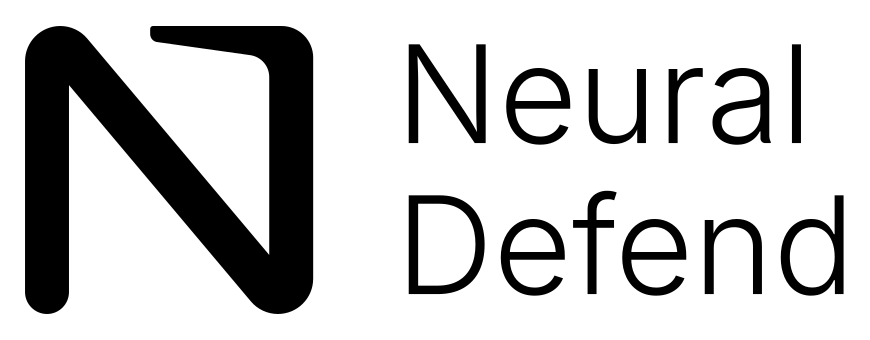
NeuroDetect marks the edited region and the generative traces. Your own duplicate search finds the source photo. The claim goes to an adjuster with the forensic report attached.

Review queueMotor claim · rear door damage
Claim photo of a silver car's rear door with a dent, three regions marked for review123
Uploaded through the claims app · illustrative image
  1. 1
    Edited region

    The dent’s pixels do not match the panel around it.

    NeuroDetect heatmap
  2. 2
    AI generation

    Generative-model traces inside the damaged area.

    NeuroDetect
  3. 3
    Recycled image

    Same car, same angle as a photo posted online.

    Your duplicate search
RouteAuto-payAdjuster review · report attached

Where each product fits

Files go to NeuroDetect. Faces and voices go to NeuroVerify.

The split follows the evidence. NeuroVerify does not analyse documents or damage photos; NeuroDetect is built for an investigator working a case.

Intake

What the customer sends

Claim photos and video, refund photos, invoices and receipts. Or a recovery selfie, video call or voice sample.

Is it real?

NeuroDetect

The file opens in a case workspace. Heatmaps and region views show what changed. The report records model version and uncertainty.

NeuroVerify

One API call on the face or voice returns one risk score, with the signal evidence behind it.

Decide

Your people and policy

Adjuster, refund agent or recovery rules. Neither product pays, refunds or resets anything.

What to do with the result

Plan for every answer.

Honest customers should not notice the check. Fabricated evidence should meet a person who has the report in hand.

Evidence file flagged

When

NeuroDetect marks an edited or generated region in a claim or refund file.

What to do

Do not auto-pay. Send it to an adjuster or investigator with the forensic report attached, and ask for an inspection or a fresh multi-angle video.

Evidence file clean

When

No edit or generation findings in the submitted media.

What to do

The claim continues through your usual checks. The report stays on file in case the claim is disputed later.

Recovery identity at risk

When

NeuroVerify scores the recovery selfie, video or voice above your threshold.

What to do

Stop the reset. Move the request to a stronger path, such as a call back to the number on file or an in-person check. Do not tell the requester which signal fired.

No result

When

The media was unusable or the call timed out.

What to do

Ask for a new capture or send it to manual review. A missing result is never treated as a pass.

Who it’s for

Anyone who pays, refunds or resets on a photo or a voice.

See how the review works in your workflow.

Integration

A workspace for your investigators. One call for recovery.

Step 1

Open a NeuroDetect workspace

Web app, private cloud, secure container, on-premises or air-gapped.

Step 2

Send flagged files to it

Your rules pick which claim and refund files get a forensic review.

Step 3

Add NeuroVerify to recovery

One call on the selfie, video or voice sample before a reset is approved.

Step 4

Route on the result

Pay, refund or reset only when your policy says so. Reports go on file.

SDK-first integration

One API.
Every stack.

NeuroVerify for the recovery step: native SDKs for Android, iOS and Flutter, plus Python, TypeScript, Go and Java for your backend. Two lines to integrate; live in under 24 hours.

Sign in for API access
$ npm install @neuraldefend/sdk

import { NeuroVerifyClient } from "@neuraldefend/sdk"
const result = await new NeuroVerifyClient().detectImage("selfie.jpg")

Mobile SDKs

Native capture apps
  • KAndroid (Kotlin)
  • SiOS (Swift)
  • FFlutter

Backend SDKs

Server-side checks
  • PyPython
  • TSTypeScript / Node.js
  • GoGo
  • JJava

REST API

For everything else

Already have capture? Send the image to POST /detect/image and get every signal back in one JSON response.

AI agents

MCP server

Give approved AI assistants bounded image and video authenticity tools, with API keys kept outside prompts.

Two lines to integrate<200 ms p95Live in under 24 hours

NeuroDetect runs as a web app, in your private cloud or VPC, as a secure container, on-premises or air-gapped. ISO/IEC 27001 · 27701 · 42001 · SOC 2 Type II.

Sources

Read the evidence yourself.

Third-party publications. None of them evaluates or endorses Neural Defend.

Does NeuroVerify check claim photos or receipts?

No. NeuroVerify analyses face images, video and audio. Claim photos, refund photos, invoices and receipts go to NeuroDetect, where an investigator reviews them.

Can the result decide the claim on its own?

No. NeuroDetect shows findings, uncertainty and a plain-language summary linked back to the evidence. The analyst makes the final call. A customer with real damage should never be refused on a score alone.

Will this slow down honest claims and refunds?

Your rules decide which files get a forensic review, for example claims above a value or refunds already flagged by your risk engine. Recovery checks with NeuroVerify return eligible image requests in under 200 ms at p95 under defined test conditions.

What about recovery done over the phone?

NeuroVerify can check a recorded voice sample. For live calls, NeuroCall (Beta) analyses the caller’s voice during the call. More on the Beta

What goes into the forensic report?

Observations, uncertainty, provenance, model and version context, and analyst notes, so a later reviewer can see how each finding was reached. Whether it meets the bar for a dispute or a court is for your counsel to judge.

Where does customer evidence go?

Your choice: managed cloud, your own VPC, a secure container, on-premises or air-gapped. Neural Defend holds ISO/IEC 27001, 27701 and 42001 certifications and a SOC 2 Type II report.

See it on your own cases

Find the fakes in claims you already paid.

Bring a sample of past claim photos, refund evidence and recovery recordings, including cases you know were fraud. See what NeuroDetect and NeuroVerify find, and what the report looks like on file.