Application → Document-led identity capture → Selfie or video session → Face match → Rules and credit decision → Disbursal
The selfie or video is the one step where a person, not a record, enters the system.
Loan origination / NeuroVerify
A loan origination system chains identity, face and credit steps into one decision. NeuroVerify adds a deepfake and manipulation check on the borrower selfie or video, and returns one risk score with evidence that your rules can act on.
It plugs into the selfie or liveness step your origination flow already calls: no new step for the applicant, one API call.
NeuroVerify does not read or verify documents such as ID cards or income proofs. It checks the face and video evidence in the flow; your origination rules decide.
The gap
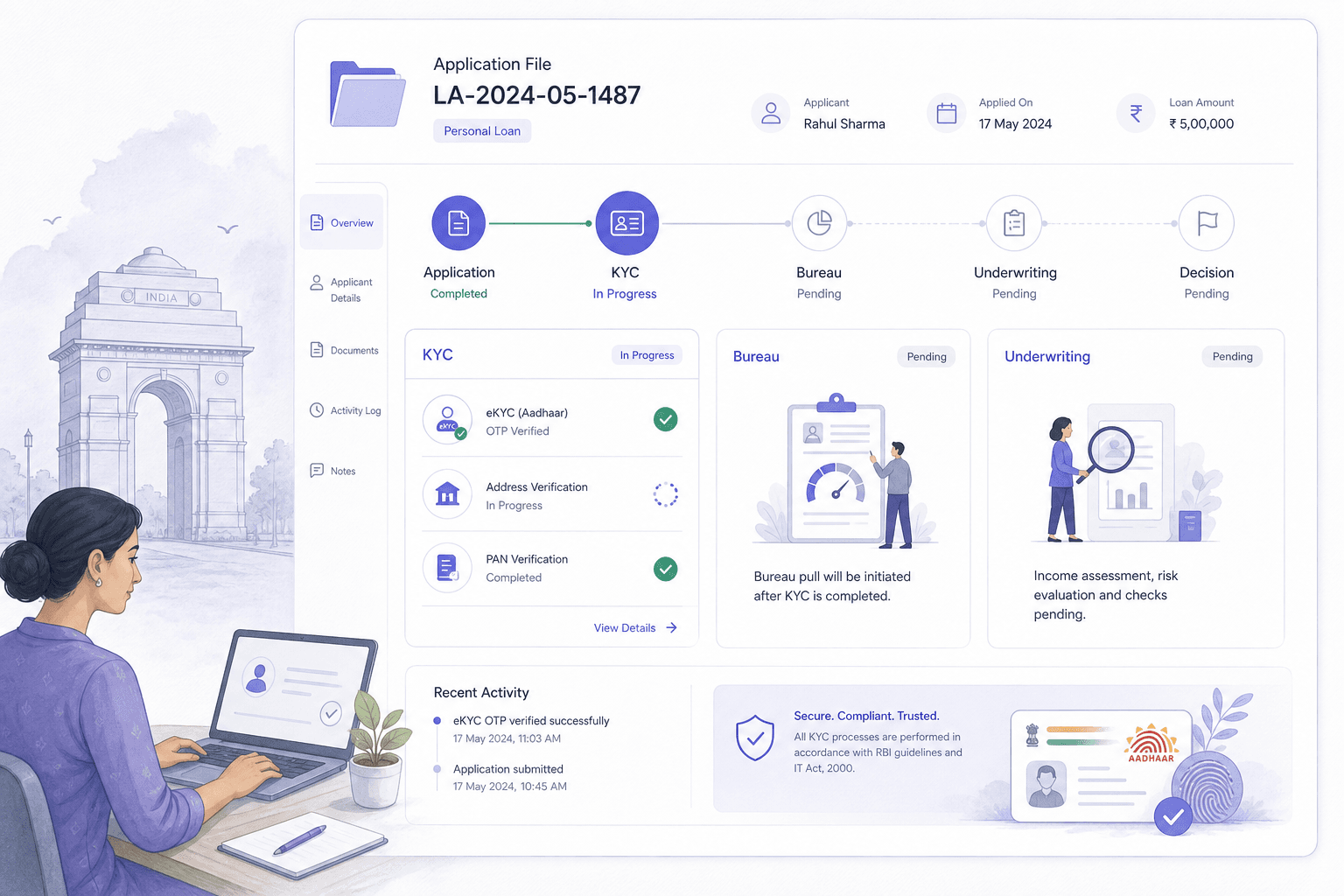
Origination systems orchestrate many checks: identity lookups, document capture, a selfie and liveness step, face match, bureau pulls and rules. Each vendor returns a pass or a score, and the system combines them.
The weak point is the input, not the orchestration. If the selfie or video was generated, swapped or injected, every downstream step receives clean-looking data. Face match compares two faces and cannot tell if both are fake. Liveness covers physical spoofs, not generated streams.
Application → Document-led identity capture → Selfie or video session → Face match → Rules and credit decision → Disbursal
The selfie or video is the one step where a person, not a record, enters the system.
In many markets, origination begins with a photographed ID document. Document checks are a separate control and sit outside what NeuroVerify analyses. What NeuroVerify protects is the face-match step that follows: the selfie, or the video session, that is compared with the face on that document.
If the selfie is manipulated, a tampered or borrowed document can look fully consistent with it. Checking the face and video evidence closes that part of the gap.
Threats
These are attack techniques on the face and video evidence, not claims about any specific lender.
The applicant submits an AI-generated or face-swapped selfie built from the face on the supplied ID. Face match passes because both images share a source.
A live swap or a virtual camera feeds a clean stream into a video session. Prompted actions are performed by a real person behind another face.
A genuine document belonging to someone else is paired with a manipulated selfie. The documents look fine; the face evidence is not authentic.
A swapped face on a live step can differ from earlier captures in the same application. Each system sees only its own step.
Real identifiers and a generated face form a persona that resolves cleanly in records. See synthetic identity fraud.
The same manipulated face is reused across loan products and channels, and each application is reviewed alone.
Background: digital injection attacks and presentation attacks against face verification.
Regulated video identification exists in several regions. India is one example; see RBI KYC, V-CIP, Liveness, and Spoof Detection.
Where NeuroVerify fits
In your LOS, NeuroVerify is one extra call after selfie or video capture. Its output is a risk score and evidence your rules engine can use like any other vendor signal.
Application → Document-led identity capture → Selfie or video capture → NeuroVerify → Face match → Risk score and origination rules
One node is added to the workflow. Existing vendors keep their roles.
NeuroVerify checks the face image, video or audio for deepfakes and manipulation beyond liveness. All six signals run together and resolve into one risk score:
- Visual Safety Screening - Live Presence Verification - Face Manipulation Detection - AI Generative Model Analysis - AI Pixel-Level Manipulation - AI Content Compliance
The response carries the unified score plus signal-level evidence. Your own policy makes the final decision.
Your document and identity vendors, your bureau and credit rules, your workflow engine, your exception queues, your consent and retention rules, and the decision on every application.
Pass the face image or frames your LOS already captures. Documents are not sent for analysis.
Add a REST or SDK call as a node in your workflow engine.
Store the score and signal evidence on the application record.
Continue, step up to review or decline using your own thresholds.
What you get
The risk score is one field your rules can branch on, with no redesign.
Document-led flows get a check on the selfie or video that anchors them.
Use the same call across personal, auto and other loan journeys.
Signal-level output is stored with the application for later review.
Two lines to integrate and live in under 24 hours, according to Neural Defend.
Questions
Liveness answers whether a live person appears to be in front of the camera. It was built for presentation attacks such as a printed photo, a mask or a screen held to the lens. It was not built to tell whether the stream reaching your server came from a camera at all, or whether the face inside it was generated or swapped.
NeuroVerify runs inside the selfie or video step you already have. Live Presence Verification is one of its six signals, and the other five look for face manipulation, generative-model traces, pixel-level edits and unsafe content in the same request. In a LOS this means one vendor node instead of liveness plus a separate deepfake service. You can keep your current liveness vendor during an evaluation and compare outcomes on your own media. See deepfake detection vs liveness detection.
No. NeuroVerify analyses face images, video and audio only. It does not read or authenticate documents. It protects the selfie or video step that is compared with the document face.
After selfie or video capture and before face match and the credit decision, so later rules can use the score.
NeuroVerify offers native mobile SDKs (Android/Kotlin, iOS/Swift, Flutter), backend SDKs (Python, TypeScript/Node.js, Go, Java) and a REST API. Integration is two lines of code, and teams can be live in under 24 hours.
NeuroVerify works from any workflow engine that can make an HTTP call. An MCP server is also available for AI agents.
NeuroVerify analyses the face images, video or audio you send and returns a risk score with evidence. Retention and residency choices follow your own policy and deployment model. Consent, retention and residency stay under your policy. See product data handling for how media is treated.
Deployment options include the managed cloud API, private cloud or customer VPC, a secure container, on-premises and air-gapped environments. Neural Defend holds ISO/IEC 27001, ISO/IEC 27701, ISO/IEC 42001 and SOC 2 Type II certifications, shown on the trust page.
NeuroVerify targets under 200 ms at p95 on eligible image requests under defined test conditions. The test methodology is available on request, so you can check it against your own media sizes and network path.
It is one API call on media you already capture, so it adds a single request rather than a new user step. Check end-to-end latency inside your workflow engine, including queue time.
NeuroVerify returns one unified risk score and signal-level evidence. It does not approve or reject anyone. Your policy sets the thresholds and decides what each band does.
Most LOS teams send mid-band results to a manual or step-up queue.
Yes, and that is the test that matters. Public results help: NeuroVerify ranked first of 36 systems on VendorBench-100, with a detection score of MCC 0.876 against 0.646 for the next-best vendor. But your capture devices, compression and attack mix decide real performance.
Replay authorized, labelled samples through your workflow in parallel with your current checks. Compare scores and evidence against your current decisions. For a vendor shortlist, see the top 5 deepfake detection APIs.
Evaluate NeuroVerify
Bring authorized media from your own journey. NeuroVerify returns a risk score with signal-level evidence, so you can compare it with your current checks before changing anything.